Run an experiment on an agent
An experiment splits part of a Voice agent's contacts across two or more variants so you can compare them on real calls. One variant is the Original, which has no changes. Each other variant changes the persona, voice, model, call flow, Q&A, or prompt fields. Use an experiment when you want call results to show which version works better before you change the agent for everyone.
Experiments exist only for Voice agents. Chat agents have no Experiments item.
Where to find it
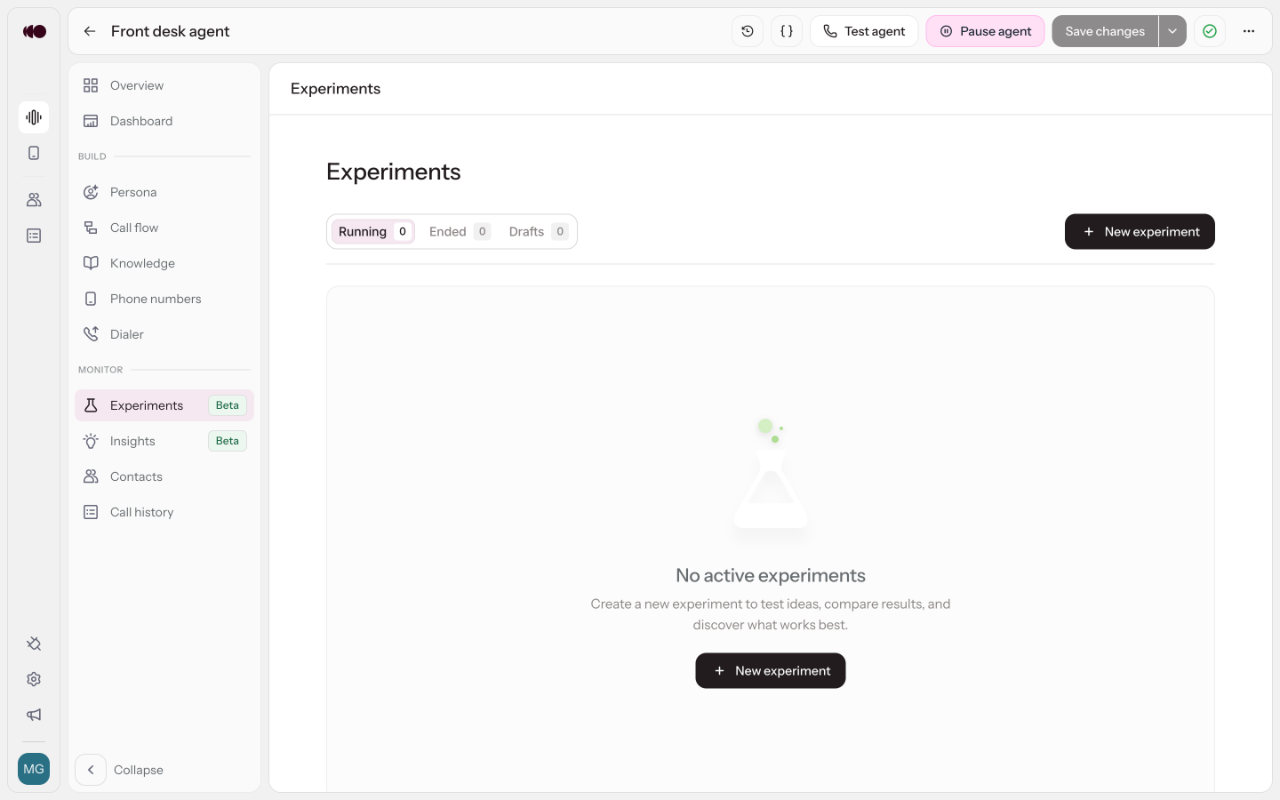
Agents > agent > Monitor > Experiments (marked Beta).
The tab has three lists: Running (running and paused experiments), Ended, and Drafts. New experiment is at the top right.
Create an experiment
- Open Experiments and click New experiment.
- Harmony creates a draft named "Untitled experiment" with two variants: A · Original and Variant B. It opens the agent's Persona tab in variant editing mode for Variant B. A bar at the top reads Editing followed by the experiment name and the variant's name.
- Change what Variant B should do differently. See "Edit a variant" below.
- Click Done in the top bar. The Experiment setup panel opens.
- In Experiment setup, fill in:
- Name. If you leave "Untitled experiment", Harmony suggests a name from the changes, such as "Call flow test" or "Tone & Q&A test".
- Hypothesis (optional). Shown under the name on the experiment's page.
- Contacts in the experiment: the percent of the agent's contacts, 1 to 100, that enter the experiment. Default 100. The rest get the agent as published.
- Variants: each variant's name and split. The splits must add up to 100%. The total shows as "N% of calls" above the list. Add variant adds Variant C, D, and so on, and resets all splits to an even share. The trash icon removes a variant (you can't remove the Original, or the last changed variant).
- Key metric: one of Answered, Identified, Qualified, Converted, Transferred. Default Converted.
- Guardrails: any of the other metrics, to watch alongside the key metric.
- Target calls: default 2,400. Run for up to: 7 days, 14 days (default), 21 days, or 28 days.
- Click Launch when you're ready to start (see "Launch, pause, resume" below), or close the panel to keep it as a draft.
Setup edits go into the agent's draft as you type. A draft experiment is off: it changes nothing on calls, even if you publish the agent with it.
To reopen a draft, open Experiments > Drafts and click its card. To delete it, click Delete draft in the setup panel and confirm. Right after New experiment, before you change anything in Experiment setup, the Discard experiment (X) button in the variant editing bar deletes the new experiment and returns to Experiments.
Edit a variant
In Experiment setup, click Set up this variant (a variant with no changes) or Add changes under a variant. Clicking one of a variant's listed changes jumps straight to where that change is made.
While you edit a variant:
- Only Persona, Call flow, and Knowledge can be opened. Other tabs are locked with the tooltip "Can't be part of an experiment". Done is the only way out of variant editing.
- The arrows in the top bar switch to the previous or next variant. They are disabled with "No previous variant" or "No next variant" at the ends.
- Siena is hidden. If Siena is still working on the agent when you start, Harmony shows "Siena is still editing this agent" and waits.
- A warning icon with a count appears in the top bar when this experiment changes the same thing as another experiment. See "Good to know".
What a variant can change:
- Persona: identity text, objective, guardrails, additional instructions, tone, company name (but it can't remove the company name), and the voice, emotion, speed, and volume.
- Call flow: goals (edit, add, remove), the model and temperature, and prompt fields. It can't add a goal as the first in a list ("A variant can add a goal only right after another goal"), can't drag or reorder goals, and can't remove a prompt field. The contact-identification step shows "A variant can't change this". If a goal sets its own model, it keeps that model in the variant.
- Knowledge: Q&A items on the Faq tab. Knowledge sources attach to the agent, not a version, so the Sources tab is hidden.
A variant can't change dialer settings (working hours, retries, hot transfer, blackout dates), the pronunciation dictionary, or call recording.
Test a variant
- Click Test agent in the agent header to open the Test call drawer.
- On the Chat or Voice tab, pick one variant from Variant. Options are grouped by experiment and read like "B · Warmer greeting". No Variant runs the tested version with no experiment applied.
- Start the test.
The picker lists variants from every experiment that hasn't ended, including drafts and paused ones. While you are editing a variant, the picker starts on that variant. The Phone tab has no picker and runs the tested version without one.
Launch, pause, resume
Launch is in the Experiment setup footer. It is disabled, with the reason in a tooltip, when:
- "Name the experiment first"
- "Publish the agent first": the agent has never been published.
- "Variant B has no changes" (or several variants): a non-Original variant changes nothing.
- "Publish your draft changes first": a variant changes a goal or Q&A item that exists only in your unpublished draft.
- "Fix the split in" followed by the experiment name: the splits don't add up to 100. The same message blocks saving the agent.
Click Launch, then confirm. Harmony publishes a new version of the agent, built from the published version with only this experiment turned on, titled Launched "<name>". Calls start splitting right away. Your other unsaved edits stay in your draft and are not published.
On a running experiment's page, Pause publishes a version with the experiment off: every call gets the agent as published. Resume turns it back on, and each contact gets the same variant as before. Both ask for confirmation and publish a new version titled after the action.
Read the results
Open Experiments and click a running, paused, or ended experiment. The page shows Key metric, Status, Started on, and, once ended, Ended on. Tabs across the top: Overview and one tab per variant.
Overview shows:
- Results, titled "Key metric:" followed by the key metric: progress toward the target ("N of target contacts"), the day count, each variant's rate with its 95% range, the change vs Original, and Chance to be best. A certainty label reads Too early to tell, Too close to call, Leaning, Likely, or Clear winner.
- All metrics: every metric per variant.
- Who gets which variant: the population percent, each variant's split, and contacts so far.
- How the lead has held up: a daily trend. It shows after day 2.
- What's being tested: each variant's changes against the published agent.
A variant tab shows How variant name is doing and What's different. The clock icon (History) opens who created the experiment, its start date, planned days, the versions it published, and a timeline of Created, Launched, Paused, Resumed, and Ended.
How the numbers work:
- Every count is a number of contacts, not calls. Answered divides by all contacts in the variant. The other metrics divide by contacts who answered.
- Certainty reads Too early to tell until 20% of the target is reached. After that it depends on the leader's chance to be best: Leaning from 60%, Likely from 80%, Clear winner from 95%, and Too close to call below 60%.
- Ready to decide appears when the target is reached. Planned days are up appears when the planned days pass first. Neither ends the experiment. You end it yourself.
End an experiment and pick a winner
- On the experiment's page, click End experiment, or open a variant's tab and click Make this the winner.
- The End experiment panel lists the variants ranked by chance to be best on the key metric, with the leader selected. Pick the winner.
- Click End & pick followed by the variant name, or End & keep the original if you picked the Original. Keep testing closes the panel.
Ending publishes a version titled Ended "<name>" (winner: <variant>) with the experiment off. It does not change the agent: every contact now gets the agent as published.
To make the winner the agent's behavior for everyone:
- On the ended experiment's page, click Apply to draft. It appears only when the winner isn't the Original.
- Harmony copies the winner's changes into your draft as ordinary edits and shows "The winner's changes are in your draft". If the draft no longer has some goals the variant changed, those changes are skipped and listed.
- Publish the agent. Until you do, calls don't use the winner's changes.
Change, copy, or delete an experiment
- A launched experiment (running, paused, or ended) can't be changed: not its variants, splits, population, or settings. To test something different, end it and start a new one. Duplicate (in the ... menu) copies it into a new draft with " (copy)" added to its name, and contacts are assigned to its variants afresh.
- Delete (in the ... menu) works on ended experiments. It is disabled with "End the experiment before deleting it" for running or paused ones. It removes the experiment from your draft, and it leaves the agent when you next publish.
With MCP tools
No MCP tool creates, launches, pauses, resumes, ends, or reads the results of an experiment.
voice_agent_preview_chat and voice_agent_preview_call have no input for picking a variant: a running experiment assigns them a variant the way it assigns real calls. To test a specific variant, use the Variant picker in the Test call drawer.
While an experiment is running or paused, voice_agent_edit and voice_agent_publish keep it as it is. A change that would alter or remove it fails with an error naming the experiment; end it on the Experiments page first.
Good to know
- Each contact is assigned to a variant by a stable hash of the contact, so retries and callbacks on outgoing calls stay on the same variant. Incoming calls are assigned again and can land a contact on a different variant than their outgoing calls.
- Two experiments overlap when any of their variants change the same goal, Q&A item, voice/persona/model setting, or prompt field. While the older experiment is running, a contact in it keeps getting its variant from the older experiment and is left out of the newer one, not counting in its results. Harmony warns, for example: "Warmer greeting changes the same goal as running experiment Short opener. Contacts in both stay in Short opener's experiment and are left out of Warmer greeting." Overlaps never block a save or launch. Pausing the older experiment releases its contacts to the newer one.
- While an experiment is running or paused, Harmony blocks deleting a goal that one of its variants changes, and blocks saving or publishing a version that would change or remove it. End the experiment first.
- Deleting a goal in your draft drops any draft experiment's variant changes to that goal, with the notice "Variant changes removed".
- Publishing an older version, or another draft, that lacks an ended experiment asks "Publishing removes ended experiments" first, because the experiment then leaves the Experiments tab.
- If someone else published the agent while you were acting on an experiment, the action fails with "This agent changed since you opened it". Reload and try again.
- Launch, pause, resume, end, apply to draft, duplicate, delete, and New experiment need permission to edit agents. Without it, the controls are disabled with "Your role can't edit agents".
- An agent whose script stores experiments in the older format can't get new ones here. New experiment is disabled with "This script keeps its experiments in an older format, so you can't add new ones here." Older-format experiments don't appear on the tab.
- There is no list of the contacts in each variant and no sample calls on the experiment page.
- Related: Concepts, Persona, Call flow, Knowledge, Build a new agent.